The Highlands UMC Podcast
There’s a new way to keep up with all the great things happening at Highlands - The Highlands UMC Podcast! To find us, just search “Highlands UMC” in the Apple Podcasts app and subscribe.
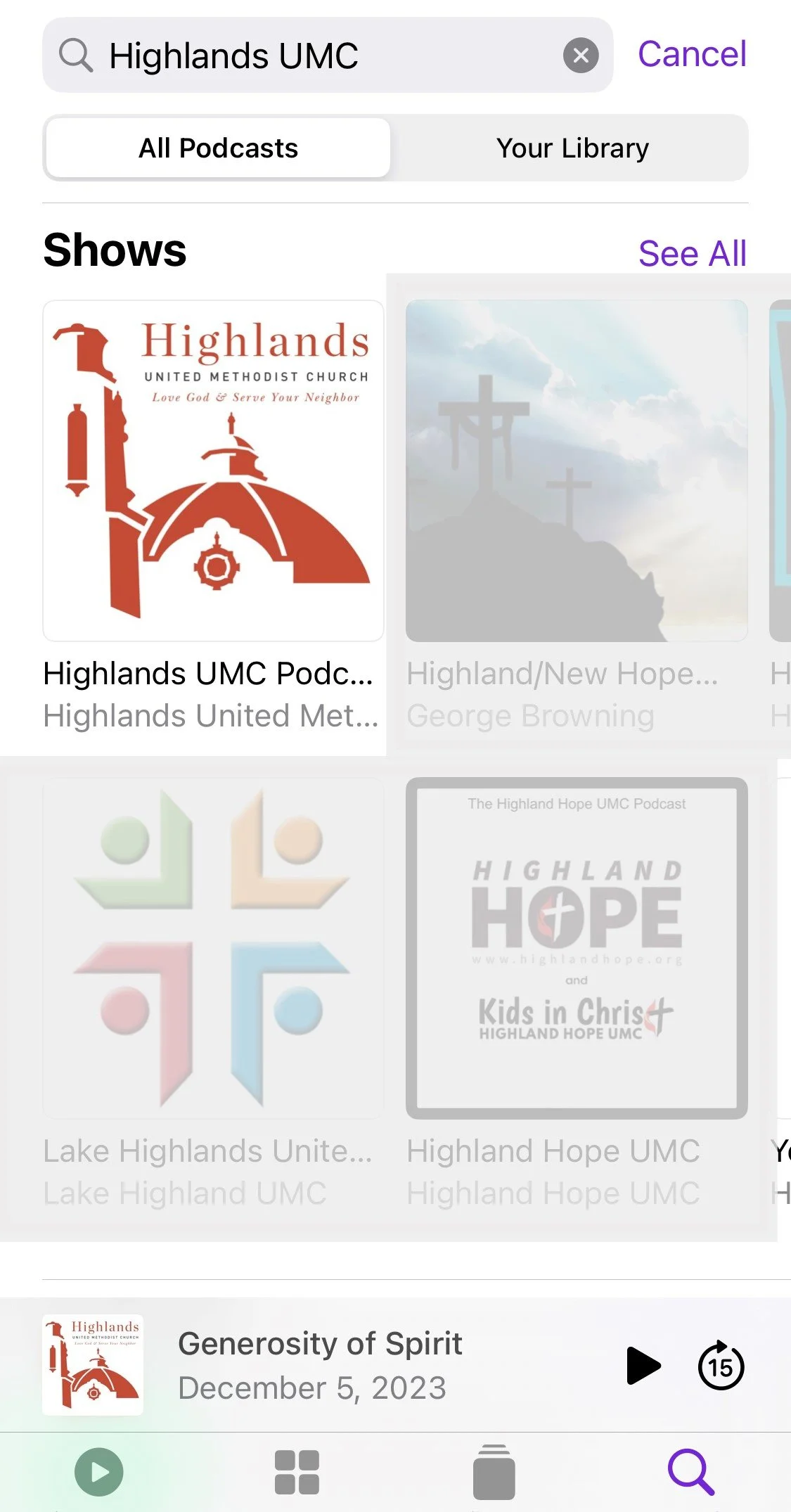
How to find us in Apple Podcasts:
1. Open the Apple Podcasts app.
2. Search "Highlands UMC" in the search bar at the top of the screen.
3. The Highlands UMC bell tower logo should appear in the list of available shows.
4. Tap on the Highlands UMC Podcast square, then tap the Follow button at the top of the screen to subscribe.
5. You’re all set! The Highlands UMC Podcast is free and available to all.
New episodes will be added as we explore how this tool will best serve our congregation's needs. Do you have ideas of something you'd like to hear? Let us know!
What if I don't use Apple Podcasts or prefer a different app to listen to my podcasts?
You can add our show to your favorite podcast or audio app by URL or listen for free on our website. Both links are provided below. You may need to do a small bit of Googling to learn how to add a podcast by URL for your specific app.
RSS Feed URL:
https://site-editor-bnyg.squarespace.com/humc-bham?format=rss